
How a Fashion Marketplace Controlled Access to Member-Only Categories



 112
 0
Exclusive collections, member-only sales, early-access drops, and VIP product selections are popular tactics used by fashion marketplaces to deliver distinct shopping experiences to their customers.
However, such campaigns require one important condition to be fulfilled: the right customers should have access to the right parts of the catalog.
This is exactly the challenge a large fashion marketplace operating on Magento 2 encountered.
The store operated:
- a public retail catalog for guests;
- member-only sale categories for registered users;
- early-access collections for selected loyalty tiers;
- exclusive limited-quantity drops reserved for certain customer groups.
In order to provide such a structure, the fashion marketplace introduced Customer Group Permissions.
Background
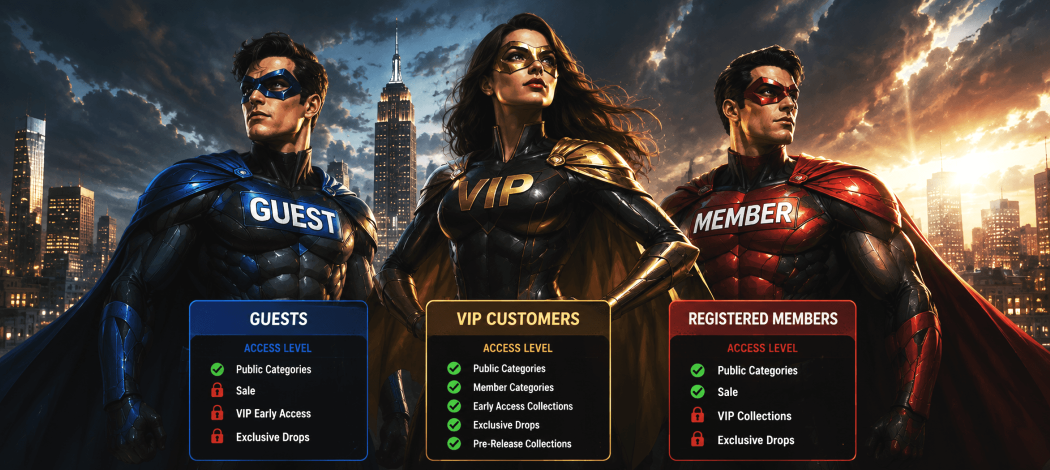
The merchant had a three-tiered customer structure:
- Guests — Not Logged In
Guests could access:
- publicly available categories;
- standard collections;
- products intended for the general public.
Sale and VIP collections were not supposed to be accessible to this customer group.
-
Registered Members
Registered members could receive access to:
- regular public categories;
- member-only sale categories;
- selected promotional collections.
These customers had broader access than guests.
-
VIP Loyalty Group
VIP customers could access:
- public collections;
- member categories;
- early-access collections;
- exclusive drops;
- other categories specially created for this customer group.
The challenge was that the store had to keep all these access levels separate from one another.
Without customer-group-based category permissions, the merchant needed a way to implement the catalog structure intended for guests, registered customers, and VIP customers.
Therefore, the store required a solution to determine which customer groups had access to which categories.
Problem
There were three main operational challenges the fashion marketplace needed to overcome:
-
Member-only categories had to be restricted
Categories like Sale or promotional collections that were created for registered members were not supposed to be accessible to guest users.
The merchant required an easy way to restrict the specified categories for the Not Logged In customer group.
-
VIP collections required a second tier of access
Collections created for selected customers were not supposed to be available to every registered user.
Thus, the fashion marketplace needed a second tier of permissions.
-
Different audiences required different levels of catalog access
A guest, a registered member, and a VIP customer did not have to see the same parts of the catalog.
The merchant wanted to keep the catalog separated for different customer groups but did not want to maintain separate Magento stores for each of them.
Therefore, the fashion marketplace required more granular control over category access.

Solution: Apply Category-Level Restrictions for Customer Groups
By introducing the Customer Group Permissions module, the merchant managed to achieve the desired three-tiered catalog access structure.
With this module, merchants can restrict categories for specific customer groups.
For restricted products or categories, the merchant can also set the behavior for customers from restricted customer groups trying to access these resources: the customer can be redirected to the login page or not found page.
That gave the fashion marketplace a solid basis for maintaining separate public, member-only, and VIP catalog sections.
FOR GUESTS — Not Logged In
Available categories can include:
- New Arrivals;
- standard collections;
- public marketplace listings.
Restricted categories can include:
- Sale;
- VIP Early Access;
- Member Exclusive Drops;
- selected promotional collections.
The merchant could set the behavior for restricted categories and redirect guests to the login page or a not found page.
For categories that become available to members after logging in, redirecting users to the login page can be especially appropriate.
Any additional messaging related to membership and how customers can join can be provided separately.
FOR REGISTERED MEMBERS
Available categories can include:
- all guest-visible categories;
- Sale;
- member-only promotional collections.
Restricted categories can include:
- VIP-only collections;
- selected early-access categories;
- exclusive drops for another customer group.
That gave registered customers access to additional catalog areas without giving them access to all exclusive categories.
FOR VIP CUSTOMERS
VIP customers can have access to more catalog areas, including:
- public categories;
- member-only categories;
- early-access collections;
- exclusive premium drops;
- pre-release collections.
That results in the following gated catalog structure:
public catalog for guests → additional categories for members → exclusive catalog areas for VIP customers.
Applying Category and Product Restrictions Together
For exclusive collections, category access may be only one of the permission rules applied.
Customer Group Permissions also allows merchants to apply product-level restrictions.
That can be helpful when the merchant needs to restrict an individual product rather than the whole category.
For example, the merchant can restrict a VIP category for guests and also apply additional restrictions to individual products where necessary.
That gives the store more flexibility when creating member-only or VIP catalog experiences.
The permission structure depends on how the merchant organizes products and categories in the store.
Parent Category Settings
Category structures in fashion marketplaces can become complicated.
A promotional section can include several subcategories, while a VIP catalog can include several collections.
Customer Group Permissions also supports parent settings for category restrictions.
This can be helpful for merchants managing multiple restrictions within the catalog hierarchy instead of dealing with every catalog area separately.
This can be especially useful for stores that operate several membership levels or have large promotional catalogs.
Potential Impact
-
More Granular Control Over Member-Only Categories
The most obvious advantage of this approach is clear: categories created for certain customer groups can be restricted for others.
For instance, a sale category intended for registered members won't be accessible to the Not Logged In customer group.
The same can apply to a VIP category being restricted for standard registered customers.
-
Clearer Customer Segmentation
Different customer groups can access different levels of the catalog.
This way, the storefront structure can correspond to the merchant's membership model instead of treating all visitors equally.
For example:
Guest → Public Catalog
Registered Member → Public Catalog + Member Categories
VIP → Public Catalog + Member Categories + VIP Collections
The segmentation becomes part of the catalog structure itself.
-
Better Protection for Exclusive Collections
Early-access and exclusive drops often rely on restricted access to these collections.
With category permissions, merchants can restrict these catalog areas for certain customer groups.
If some products in the catalog require additional access restrictions, the merchant can also apply product-level permissions.
-
Cleaner Browsing Experience
Not every customer has to access every category in the catalog.
Separating public, member, and VIP areas can provide a more relevant catalog structure for each group.
Guests can access public collections, while registered customer groups can have access to additional areas.
-
Easy Permission Management
The module allows merchants to set up category restrictions for customer groups without requiring specific programming knowledge for basic configuration.
This is especially valuable if access rules change during campaigns or if there are several customer groups with different catalog access rights.
Category Restrictions in the Context of a Membership Program
Customer Group Permissions doesn't create the membership program by itself.
It doesn't define VIP customers or membership benefits.
What the module allows merchants to do is apply permissions based on the customer-group structure already configured in the store.
If the Magento store already separates its customers into several groups such as:
- Not Logged In;
- Registered Members;
- VIP Customers;
then the merchant can restrict catalog access based on these customer groups.
That makes category permissions a useful complement to a membership strategy.
The store's membership or loyalty system can determine which customers belong to which customer groups.
Customer Group Permissions can then help determine which catalog areas these customer groups have access to.
Using Redirect Settings for Restricted Categories
The module allows merchants to set up the behavior for restricted customer groups trying to access a specified category or product.
Depending on the strategy, the customer can be redirected to:
- the login page;
- or the not found page.
These two options can serve different purposes.
In the case of a member-only sale, redirecting a guest to the login page is reasonable since access to the specified category depends on authentication.
However, for a catalog area that shouldn't be exposed to a certain customer group at all, the not found page may be more appropriate.
The module provides the restriction behavior, while any additional messages and registration prompts can be handled separately.
More Than Just Category Restrictions
Even though this use case focuses on category permissions, Customer Group Permissions provides more options for customer-group restrictions.
The module also allows merchants to restrict:
- products;
- categories;
- payment methods;
- shipping methods;
- wishlist functionality;
- product attributes.
That means the same customer-group structure can be used to restrict several aspects of the shopping experience.
For instance, a wholesale customer group may need access to a certain category while using different shipping or payment methods.
The merchant can decide which permissions need to be introduced for each customer group.
Building a Guest → Member → VIP Structure
For a fashion marketplace, customer-group permissions can help implement the membership strategy through the catalog structure.
Instead of simply marking a collection as VIP while keeping the same access rules, the merchant can establish actual differences between customer groups.
Guests can have the public shopping experience.
Registered members can have access to additional catalog areas.
VIP customers can have the most extensive catalog access, including collections created specifically for that group.
However, category restrictions don't automatically increase the number of registrations, loyalty engagement, or conversion rates.
Those results depend on the value of the membership program, products and pricing, marketing strategy, and the overall customer experience.
What category permissions provide is the technical ability to implement the access structure behind those experiences.
Conclusion
For marketplaces and fashion retailers, category visibility can be more than just an organizational tool.
When a store operates public collections, member-only sales, early-access categories, or VIP drops, different customer groups may need different levels of catalog access.
The Customer Group Permissions module allows merchants to restrict categories for selected customer groups and set up the behavior for restricted customers trying to access them.
Combined with product-level restrictions where necessary, this module can provide:
- customer-group-based category access;
- member-only catalog areas;
- VIP collections;
- separation between public and exclusive content;
- a structured catalog experience for different audiences.
The module doesn't create the membership program itself.
Instead, it provides the tools needed to apply an existing customer-group strategy to the Magento catalog.
For membership-based stores, controlling catalog access is an important part of keeping public, member-only, and VIP shopping experiences separated.
112
0
Please complete your information below to login.
Sign In
Create New Account